Chapter 1 · Mandatory from 27 Sep 2026
The EU legal guarantee notice: what your shop needs from 27 September
From 27 September 2026, every shop selling goods to consumers has to show a harmonised notice on the legal guarantee: a sheet by the European Commission with a QR code. You may not redesign it. Here is where it goes, what you must not change, how it works in your shop system, and a builder below that gives you the finished code.
Last checked: · A reference, not legal advice.
The essentials
- From
- 27 September 2026.
- Who
- Everyone who sells goods to consumers, in a shop or online.
- What
- The official sheet from the European Commission, shown in full and in colour online.
- Where
- Clearly visible in your shop, for example as a sentence in the header, on the product page or in the checkout that opens the notice on the first click. Plus in the order confirmation.
- Also
- A clickable link to the same destination as the QR code, in English europa.eu/youreurope/guarantees.
- Not allowed
- Changing colours, fonts, spacing, the border or the QR code; cropping or stretching.
What the notice looks like
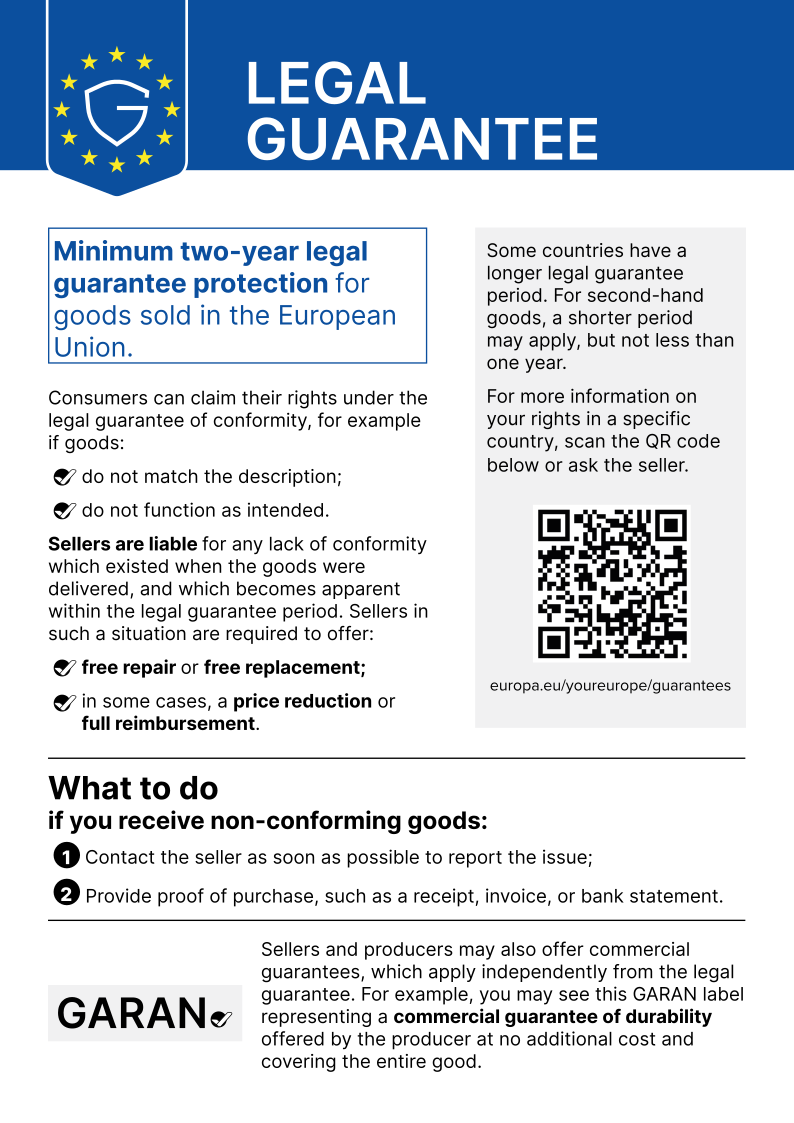
Where it goes in your shop
The Commission requires the notice to be displayed “in a prominent manner” online, for example as a general reminder on the website. Its guidelines show three examples, each as a sentence like “Your legal guarantee rights” that opens the notice on the first click or mouse-over:
In the header
Reachable from every page. The simplest spot, because it covers the whole shop.
On the product page or catalogue
Where the buying decision happens.
In the checkout
Right before the order is placed.
It should also go into the order confirmation email. The list is explicitly not exhaustive. To be on the safe side, put it in the header and the checkout, and add it to the confirmation email.
What to watch out for
- Use the official file, the colour version (RGB) online.
- It must be legible at default display size. Test it on a phone.
- Always add a clickable link to the same destination as the QR code.
- Change nothing: no other colours, filters or effects, no other fonts, no other spacing.
- Keep the border and separator line; do not move, resize or edit the QR code.
- Do not crop, stretch or split it into parts.
Source: Commission guidelines, sections 2.1.4 and 2.3.
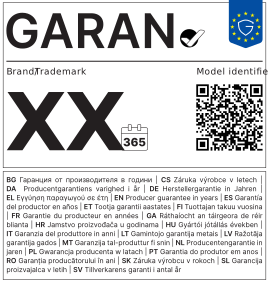
And the GARAN label?
The GARAN label is something else: it shows a voluntary durability guarantee from the producer. It is only mandatory when the producer offers such a guarantee at no extra cost, for the whole product and for more than two years.
Then it has to be shown with that product, clearly visible before purchase, directly before ordering in the checkout, and in the order confirmation. In colour online; a small compact version is allowed if the full label opens on the first click or mouse-over.
Years, brand and model are filled in by the producer. According to the guidelines, sellers should not go looking for this information themselves; the producer provides it.
Setting it up in your shop system
As of 25 Sep 2026. The information comes from the providers or agencies who built it; each row names its source. Check before the deadline that your version fits.
| System | Status | Source |
|---|---|---|
| Shopware 6 | Built in from version 6.7.14, backported to 6.6. Notice in the checkout, GARAN label below the buy box. | nuonic |
| JTL-Shop | Built into version 5.8.0 (released 26 Sep 2026), not for older versions. | WebStollen |
| WooCommerce | Through the legal plugins Germanized (4.1+) or German Market (4.0+). Check the settings after updating. | MarketPress |
| Shopify | Nothing built in found, but several apps in the App Store. Without an app: put the code from the builder into a custom code section of your theme. | Shopify App Store |
| Wix, Jimdo, Squarespace, your own site | No ready-made solution found. Upload the file and add the code from the builder through your system’s HTML or code block. | – |
| Marketplaces (Amazon, eBay, Etsy, Kaufland …) | The obligation stays with you as the seller, but the platform decides where the notice can appear. Not all had announced a solution by 25 Sep; ask your marketplace and keep the answer. | IT-Recht Kanzlei (German) |
The builder
Pick a language, download the official file, upload it to your shop, copy the code and paste it in. The code points to the file in your shop, not to this site: your shop does not depend on me, and no visitor data comes to me.
Your code
<!-- EU-Hinweis zur gesetzlichen Gewährleistung (offizielle Datei, unverändert) -->
<details class="eu-gewaehrleistung">
  <summary style="cursor:pointer;text-decoration:underline">Your legal guarantee rights</summary>
  <a href="/eu-gewaehrleistung-en.svg" target="_blank" rel="noopener"><img src="/eu-gewaehrleistung-en.svg" alt="EU notice on the legal guarantee: goods sold in the European Union come with a legal guarantee of conformity of at least two years. The seller must repair or replace non-conforming goods free of charge, and in certain cases reduce the price or refund it. More at europa.eu/youreurope/guarantees." width="595" height="842" style="display:block;width:100%;max-width:595px;height:auto;margin:12px 0"></a>
  <p><a href="https://europa.eu/youreurope/guarantees" target="_blank" rel="noopener">europa.eu/youreurope/guarantees</a></p>
</details>
Preview
Sources
Questions about this chapter
Is the sentence “Statutory warranty rights apply” enough?
No. Online, the complete official notice should be shown in colour, plus a clickable link to the EU page. A sentence may open it, but does not replace it.
Can I adapt the notice to my design?
No. Colours, fonts, spacing, border and QR code stay as the Commission supplies them. You only decide where it sits and how it opens.
Which language?
The notice exists in all 24 official EU languages. Use the one your shop sells in; with several languages, the matching one for each.
Do I need the GARAN label too?
Only for products whose producer gives a free durability guarantee for the whole product for more than two years. No such guarantee, no GARAN label.
I only sell on a marketplace. What do I do?
The obligation stays with you, but the platform decides where the notice can appear on your listings. Ask your marketplace if nothing arrives before the deadline, and keep the answer.
Is this legal advice?
No. It is the current state with sources and dates. For your specific case, ask a lawyer or your trade association.
Related rules
- Chapter 4Right to repair When a customer complains, you have to tell them they may choose repair or replacement, and that a repair extends the legal guarantee by twelve months.
- Chapter 2The withdrawal button Customers must be able to withdraw from an online purchase via “withdraw from contract” in two clicks, with an acknowledgement.
- Chapter 8Product safety (GPSR) Every listing needs the manufacturer’s address, a product picture and identifier, and the safety warnings.